A monitor button that turned into a voice assistant
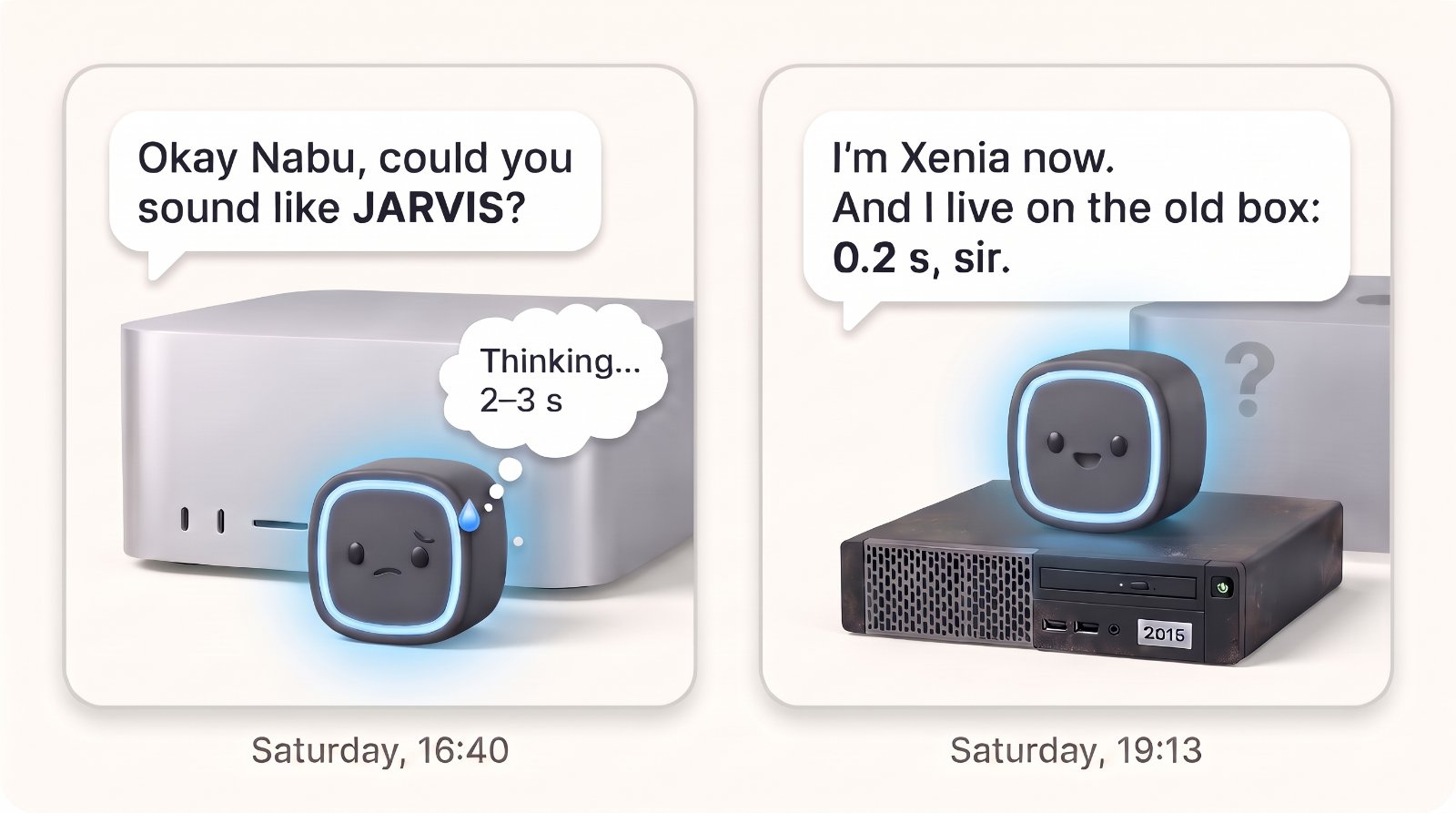
I have two small Home Assistant Voice speakers at home. I say “Okay Nabu” and a command, and the house answers. For a long time it answered badly, slowly, or not at all. This post is about the one Saturday when that changed, and mostly about the choices on the way: which speech recognition, which voice, which AI “brain”, and where each of them should run.
It took about eight hours, from lunch to midnight, and it started with something else entirely. Claude, the AI from Anthropic, was my JARVIS for the day: I asked and decided, and it measured, built and wrote everything down.
The short version
- The problem. My voice assistant was broken, and even when it worked it needed the internet for everything.
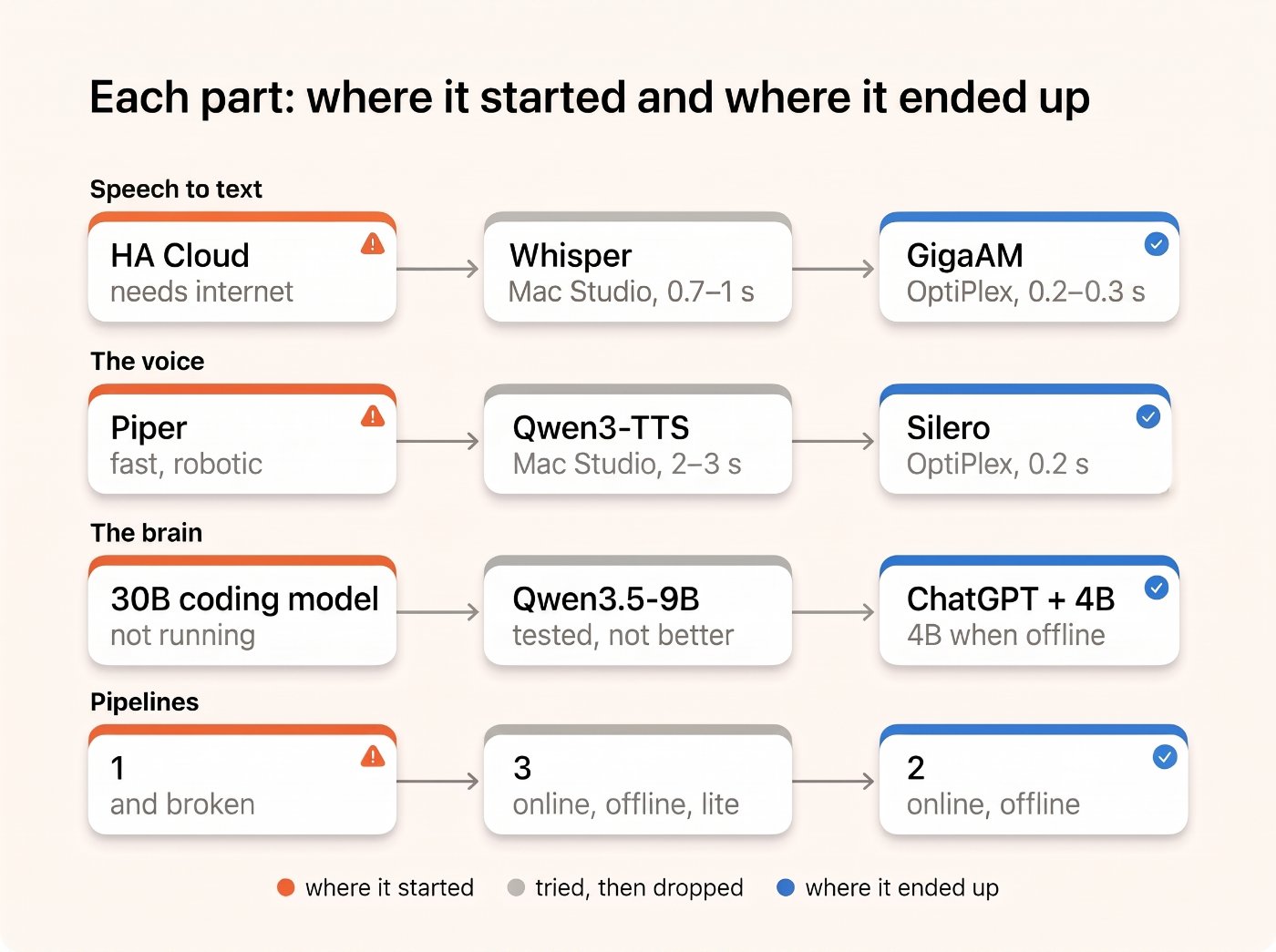
- What I tried. First the “powerful” setup: speech in and out on my Mac Studio, with models that sound great. Then I measured the same jobs on the old Dell OptiPlex that runs Home Assistant, and the old box won.
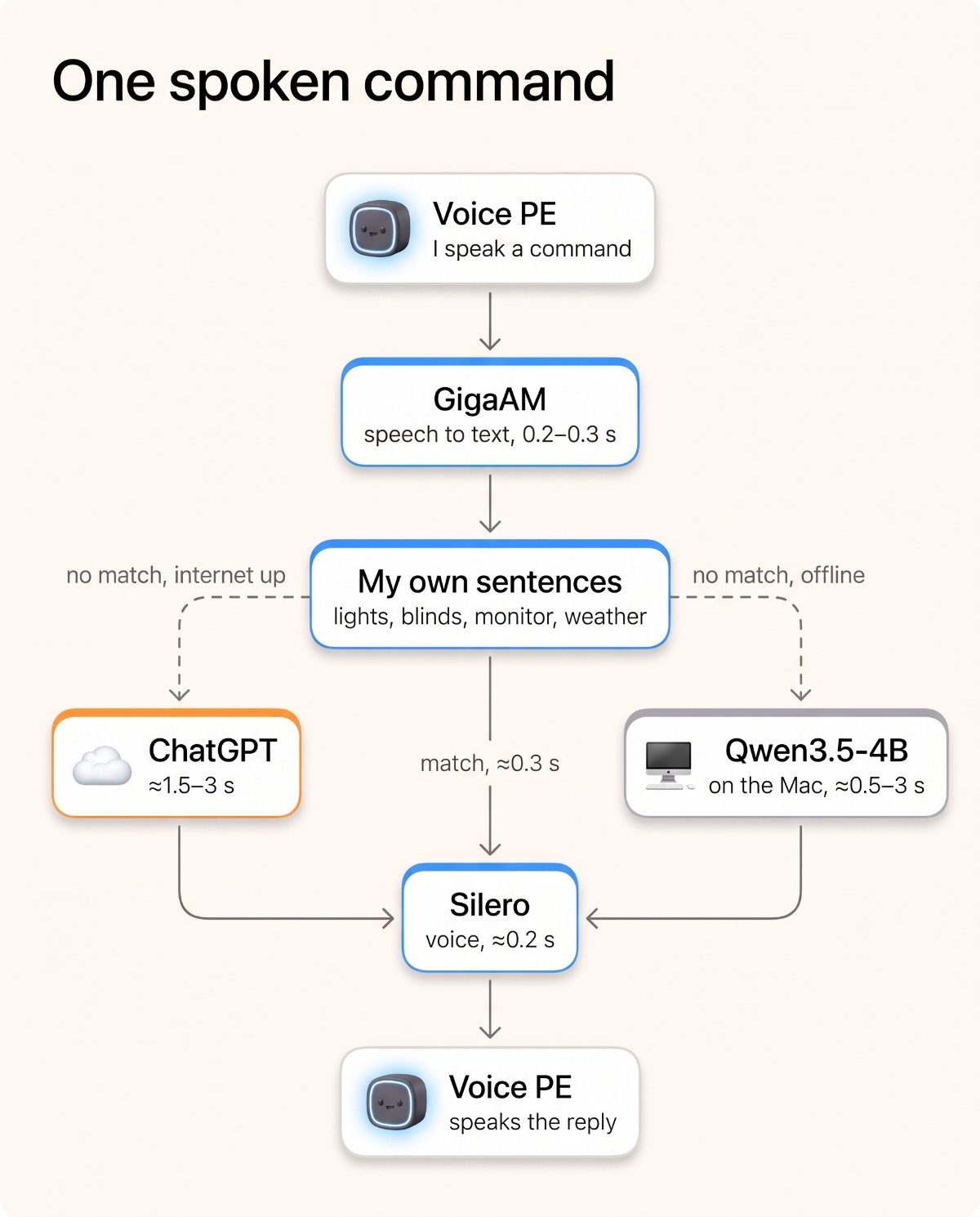
- What runs now. Speech to text in 0.2–0.3 s and the reply voice in about 0.2 s, both on the OptiPlex. My own sentences answer most everyday requests in a few hundredths of a second, without internet.
- What’s still weak. Anything my sentences don’t cover goes to a “brain”: ChatGPT when the internet is up, a small model on my Mac when it’s down. The brain is slower, and it doesn’t always tell the truth.
A few names you’ll meet:
| Name | What it is |
|---|---|
| Voice PE | Home Assistant’s own small smart speaker; it hears the wake word itself and sends the rest to Home Assistant |
| Speech to text (STT) | turns my voice into text |
| Text to speech (TTS) | turns the answer into a voice |
| The “brain” | a large language model, like ChatGPT, that gets the request when nothing simpler understands it |
| Pipeline | Home Assistant’s chain for one command: STT, then the brain or its own sentences, then TTS |
It started with a monitor button
I wanted one button to switch my big monitor between my Mac Studio and my work MacBook. Almost every button idea had the same flaw: it needed me to be logged in. Then I looked at the voice speaker on my desk and asked whether I could just say it. That works now (Home Assistant tells the Mac, and the Mac tells the monitor), but on the way Claude looked at the voice assistant itself, and that turned into the real project.
Round one: everything on the Mac Studio
The old setup sent anything that wasn’t a simple built-in command to a big coding model on my Mac Studio, which wasn’t even running, and it needed the internet to understand speech at all. I wanted the basics to work without internet and a smarter brain for the rest. I also talk to these speakers in Russian, which matters for everything below, because many good speech models are English-first.
My Mac Studio (M2 Max, 32 GB) had two apps I had played with: VoiceStudio for speech, and Unsloth Studio for local AI models. Claude’s first verdict on VoiceStudio was “it does not help”. I asked it to look properly, and after reading the documentation and measuring, it changed its mind: Whisper in VoiceStudio understood my test sentence word for word in about a second, and its Qwen3-TTS voice sounded close to a cloud voice. I listened to the samples and liked them.
So round one put speech in and out on the Mac, ChatGPT as the brain, and a small 4B model on the Mac for when the internet is down. By 16:09 my first spoken command worked.
| Round one | |
|---|---|
| Pros | natural voice, exact recognition, everything local except ChatGPT |
| Cons | the voice took 2–3 s per sentence; it all depended on the Mac I develop on being on and logged in; VoiceStudio held about 6 GB of memory on a Mac where I also build iPhone apps |
Where the time went
Before changing any part, Claude measured my real commands. A command that matched one of Home Assistant’s own sentences took 4.4 s from my audio to the reply text, and one that missed and went to ChatGPT took 9 to 20 s. Most of the misses had nothing to do with models. Home Assistant simply didn’t know my rooms and lamps by the names I actually use, so it passed easy commands to ChatGPT.
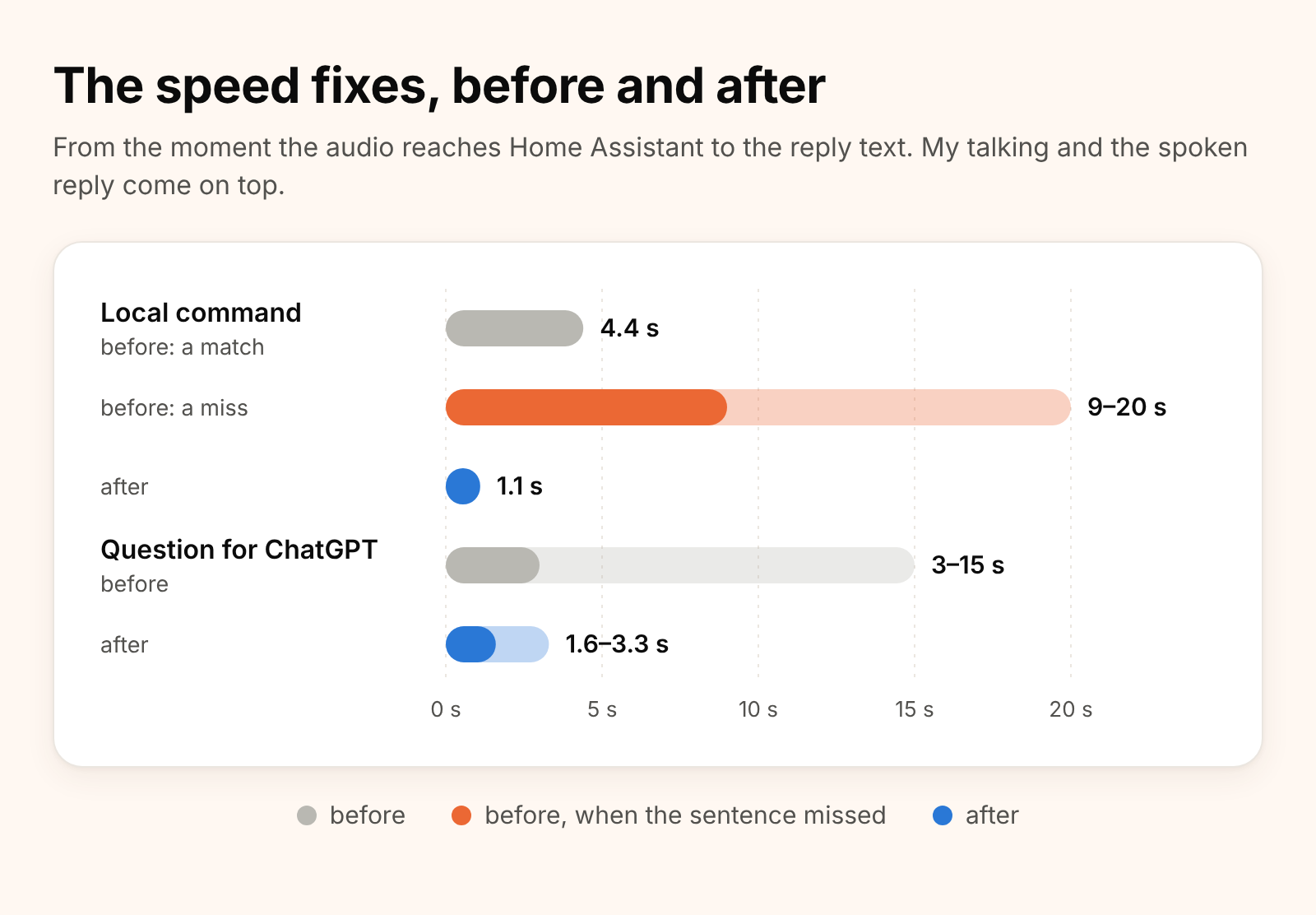
The fixes were small: names for rooms and devices in the forms people say them, ChatGPT without web search and with a one-sentence limit, the speech model kept loaded instead of unloading after 15 idle minutes, and the speakers set to stop listening sooner after I finish talking. ChatGPT also got a rule never to claim it did something it hadn’t done, because earlier that day it had answered “I turned on the light” and changed nothing.
Comparing voices
At this point I also asked for a JARVIS-like voice. Claude designed three (a dry butler, a calm AI baritone and a warm butler), and said it wouldn’t clone the actor’s real voice from the films, which I think is right. I kept the voice I had, and I then asked which local voice was fastest. Claude tried three more models on the Mac, and none of them beat the one I had. But it also suggested Silero, a small text-to-speech model with good Russian voices that runs on an ordinary CPU.
Then I asked the question that changed the day:
what speed is on HA itself?
Home Assistant runs on my old OptiPlex, with an Intel i5-6600 from 2015. Claude ran the test there, in a temporary folder that it deleted afterwards.
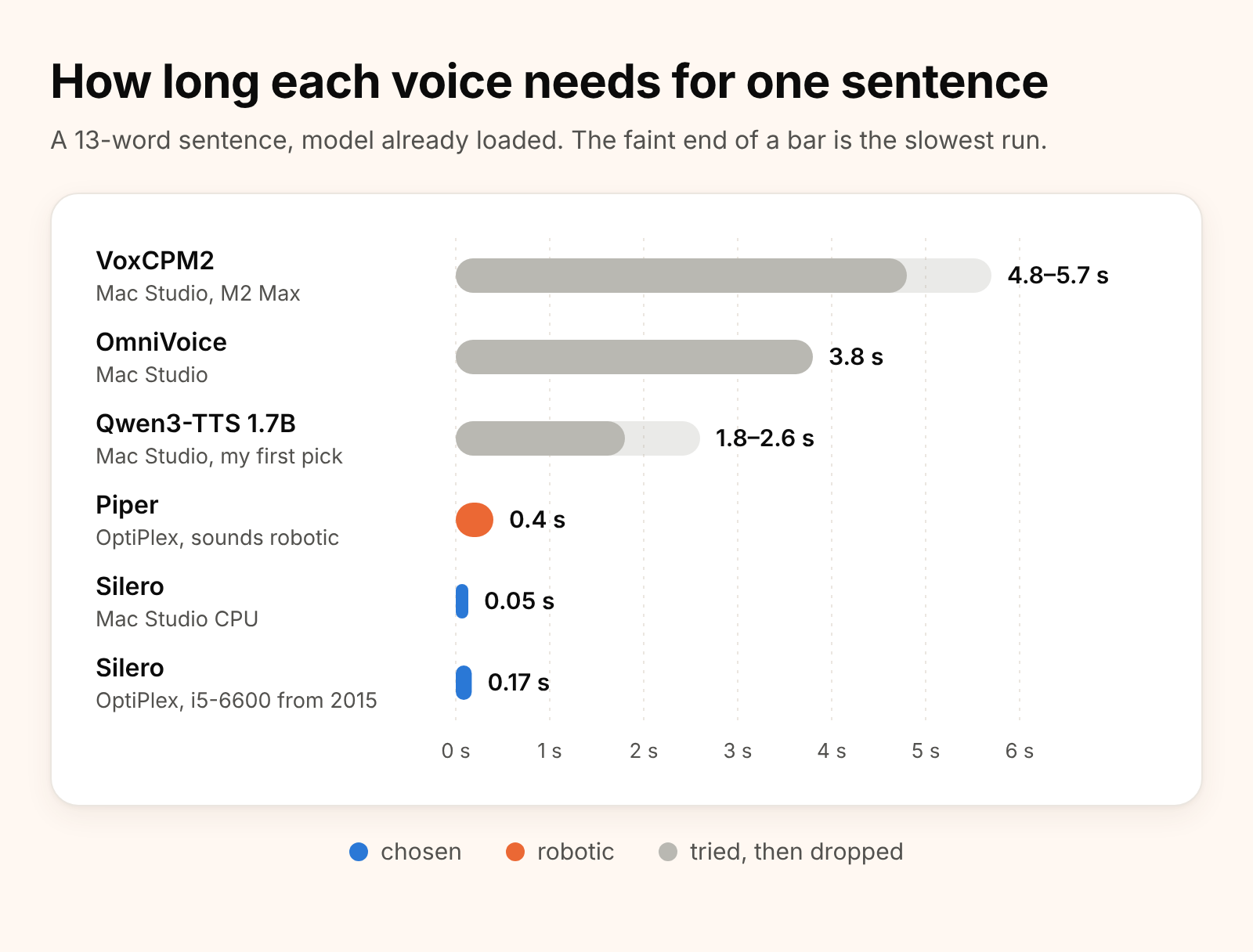
| Voice | Speed for one sentence | Sound | Notes |
|---|---|---|---|
| Piper | 0.4 s | robotic | already in Home Assistant |
| Qwen3-TTS 1.7B | 1.8–2.6 s | the most expressive | needs the Mac’s GPU, and it speaks slowly (7 s for a sentence Silero says in 5) |
| OmniVoice | 3.8 s | good | misread a word, and some outputs were cut off |
| VoxCPM2 | 4.8–5.7 s | good | the slowest, and it misread a word too |
| Silero | 0.17 s on the old OptiPlex | natural | Russian, Belarusian, Ukrainian and English voices; skips digits, so numbers must be turned into words first |
I was really surprised, because the 2015 CPU made a natural voice ten times faster than the Mac did with the voice I had chosen at lunchtime. So Claude built a small Silero service in a container on the OptiPlex. Any service in the house can use it, and the model and voice are chosen per request. Silero isn’t only Russian: one of its models (v5_cis_base, MIT licence) has Belarusian voices too, and Claude tried one through the new service and it worked, so the same box can also speak Belarusian, Ukrainian and English. Claude added a small converter for numbers, units and times, because without it Silero says “the temperature is degrees”. At 19:13 the speakers spoke with the new voice, which is called Xenia. So I asked for JARVIS and ended up with Xenia, and I’m fine with that.
Comparing speech to text
The Mac still did the speech recognition, and I wanted to know whether that could move too. The answer was already installed and doing nothing: Home Assistant’s own Whisper add-on. When you set it to Russian, it quietly switches to GigaAM, a model made for Russian that runs on a CPU.
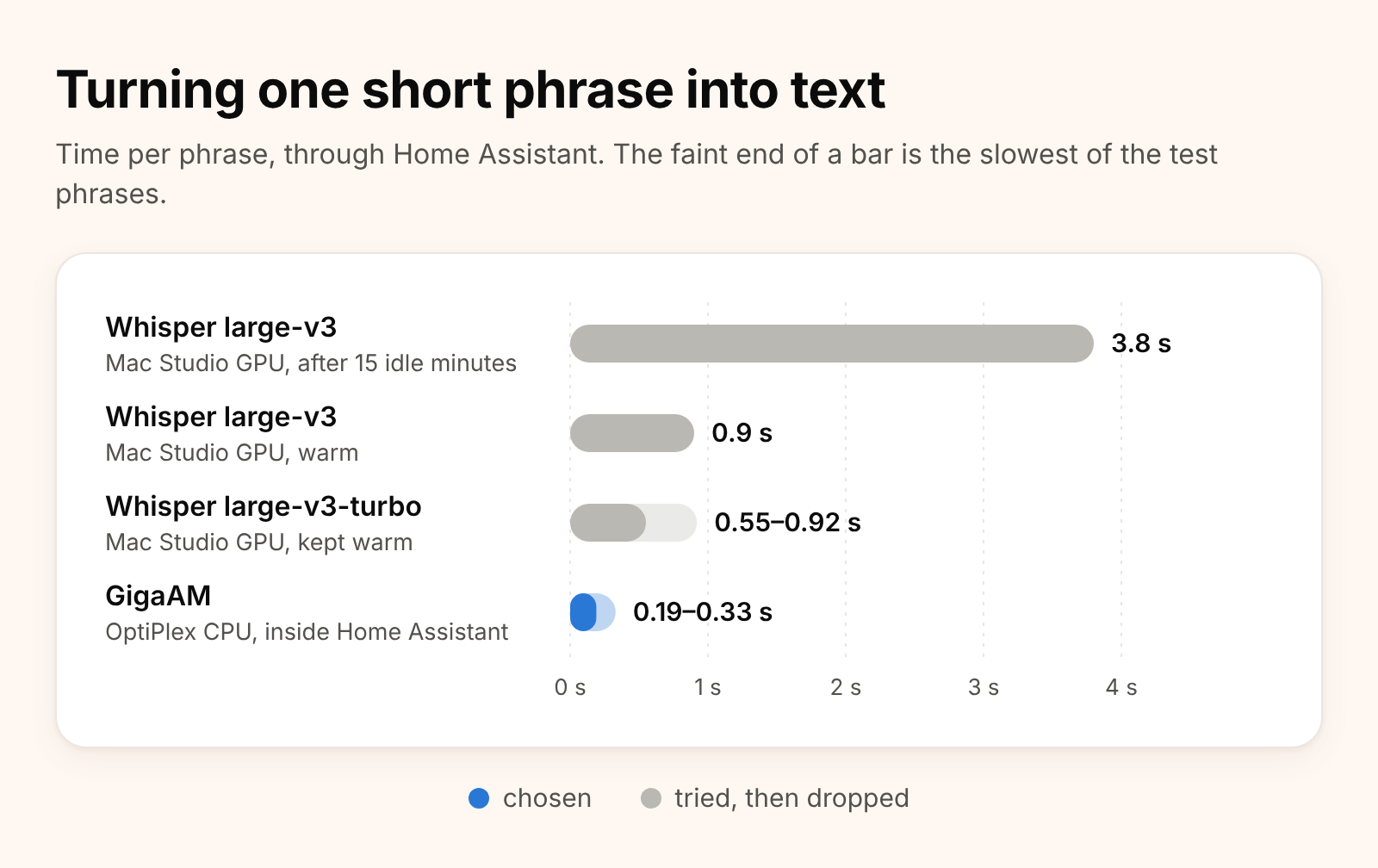
| Speech to text | Speed | Accuracy on 9 test phrases | Depends on |
|---|---|---|---|
| Home Assistant Cloud | about 1 s | good | the internet |
| Whisper large-v3-turbo on the Mac | 0.55–0.92 s | 9 of 9 | the Mac being on and logged in |
| GigaAM on the OptiPlex | 0.19–0.33 s | 7 of 9 | nothing outside the OptiPlex |
GigaAM made two mistakes on recorded test clips, so I tested it by speaking, and it was fine. At 21:20 the Mac left the normal path completely. That felt good, because now the Mac I develop on can reboot, sleep or run Xcode without the lights caring.
Comparing brains
The brain only matters when none of the house’s own sentences match, but it’s the slowest and least reliable part, so it got its own comparison.
| Brain | Answer time | Correct on 8 test questions | Memory | Verdict |
|---|---|---|---|---|
| Qwen3-Coder 30B on the Mac | — | — | about 18 GB | a coding model, too big, and it wasn’t even running |
| ChatGPT (gpt-4o-mini) | 1.5–3 s | not in this test | none at home | the default while the internet works |
| Qwen3.5-9B on the Mac | 0.5–2.9 s warm, 20 s cold | about 5 of 8 | about 6.5 GB | not better than the 4B, so dropped |
| Qwen3.5-4B on the Mac | 0.4–1.8 s warm | about 6 of 8 | about 4.5 GB | the offline fallback; it once said nine times six is 72 |
The small model had one more surprise. After we gave Home Assistant all those device names, the description it sends to the model grew to 8,819 tokens, while the model accepted 8,192, so every offline question failed. Claude found that its own earlier fix had caused this, said so plainly, and raised the limit. Then the first answer took 13 seconds, because the model had to read that long description from scratch. A small automation that asks it one throwaway question every hour keeps it warm.
Simpler is better
By the evening there were three pipelines: online, offline, and a “lite” one for when the Mac is down. When I asked whether that was too complicated, Claude switched the offline brain off and tried the offline pipeline anyway. The time, the lights and the monitor still answered at once, because the house’s own sentences are always tried before any brain. So “lite” was not needed, and now there are just two pipelines, picked by an automation that pings the internet.
Making the house answer by itself
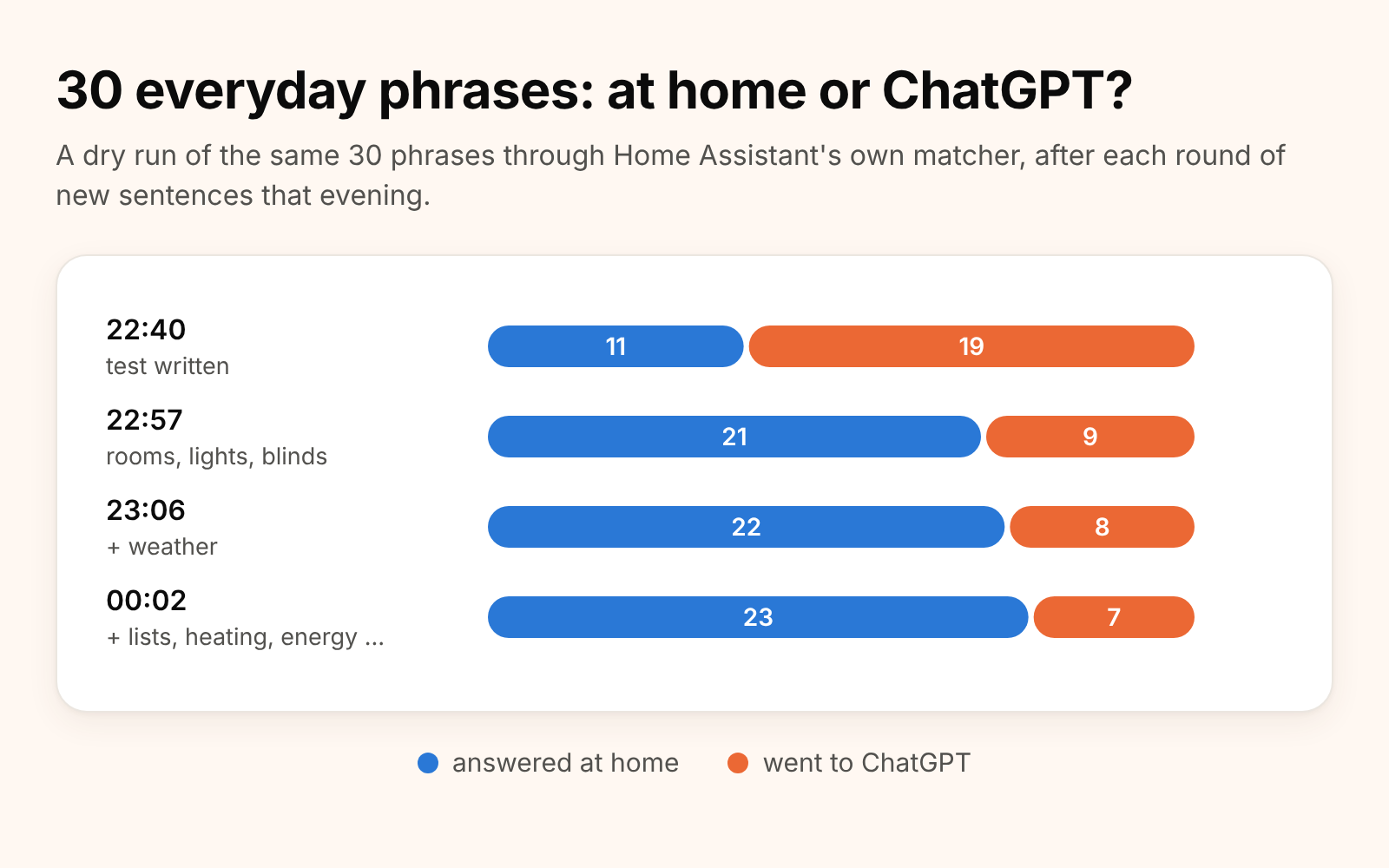
The fastest brain turned out to be no brain at all, so at 22:40 I asked how to send fewer requests to ChatGPT. Claude wrote 30 everyday phrases and ran them through Home Assistant’s own sentence matcher without switching anything, and only 11 of 30 matched. The rest went to ChatGPT, which takes seconds and sometimes isn’t honest.
So we added sentences for the things I actually ask, with the answers taken straight from the house’s sensors: the temperature and humidity in a room, whether the blinds are open, which lights are on, brighter and dimmer, everything off. I pointed out that the weather can be answered locally too, because Home Assistant already has a forecast for the house. By midnight 23 of the 30 were answered at home, in a few hundredths of a second, and they work without internet.
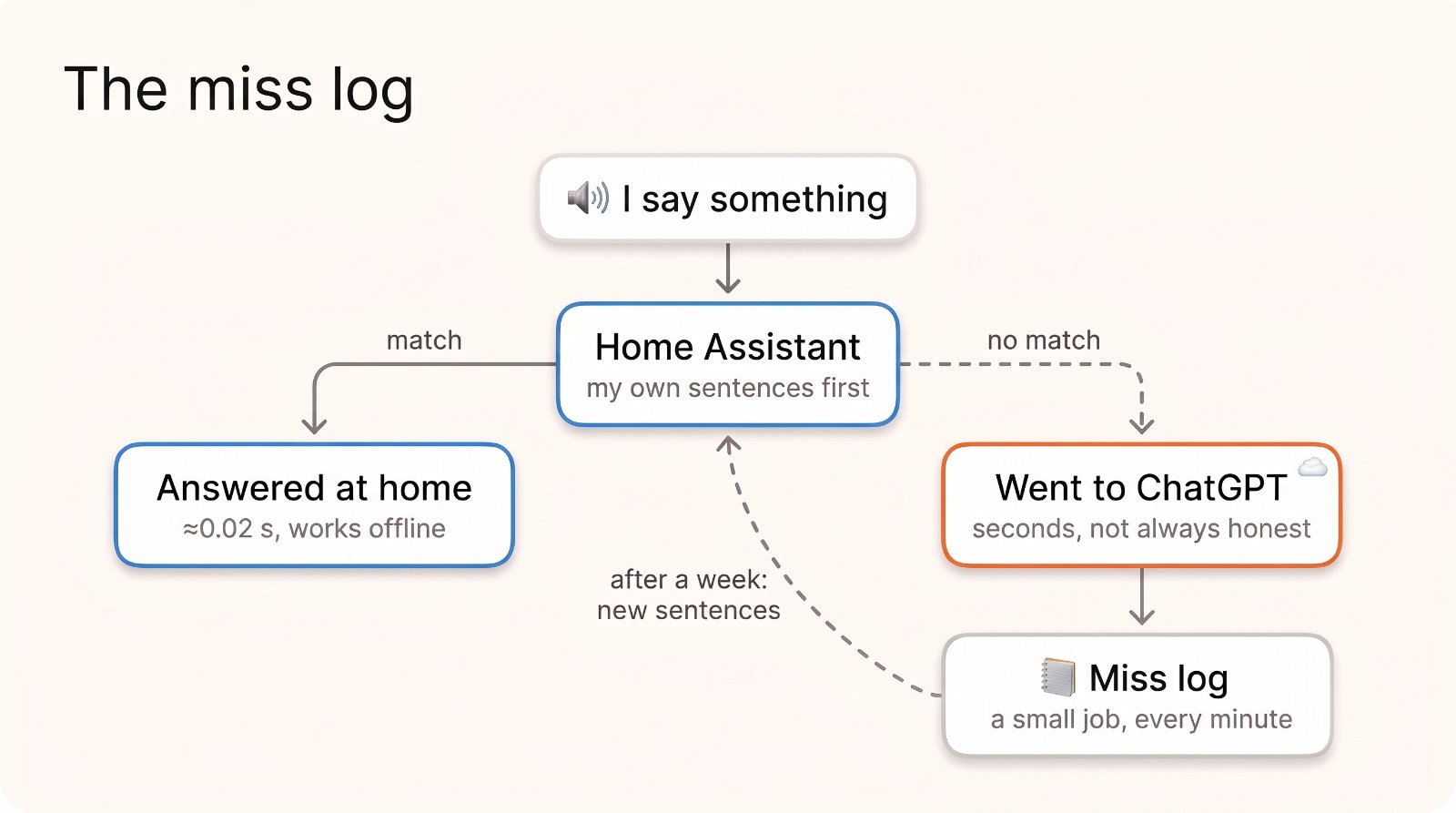
The last piece was a miss log. Home Assistant keeps recent voice requests only in memory, so a small job copies every request that went to the brain into Home Assistant’s Logbook, and after a week we read the list.
A week later
Two things happened that week. First, a night-time network reboot left both speakers without their wake word, and Home Assistant only showed “unavailable”, so nothing looked wrong. Now an automation checks that every hour and fixes it. And the miss log showed what I really say. Since then every request is logged, so I have real numbers:
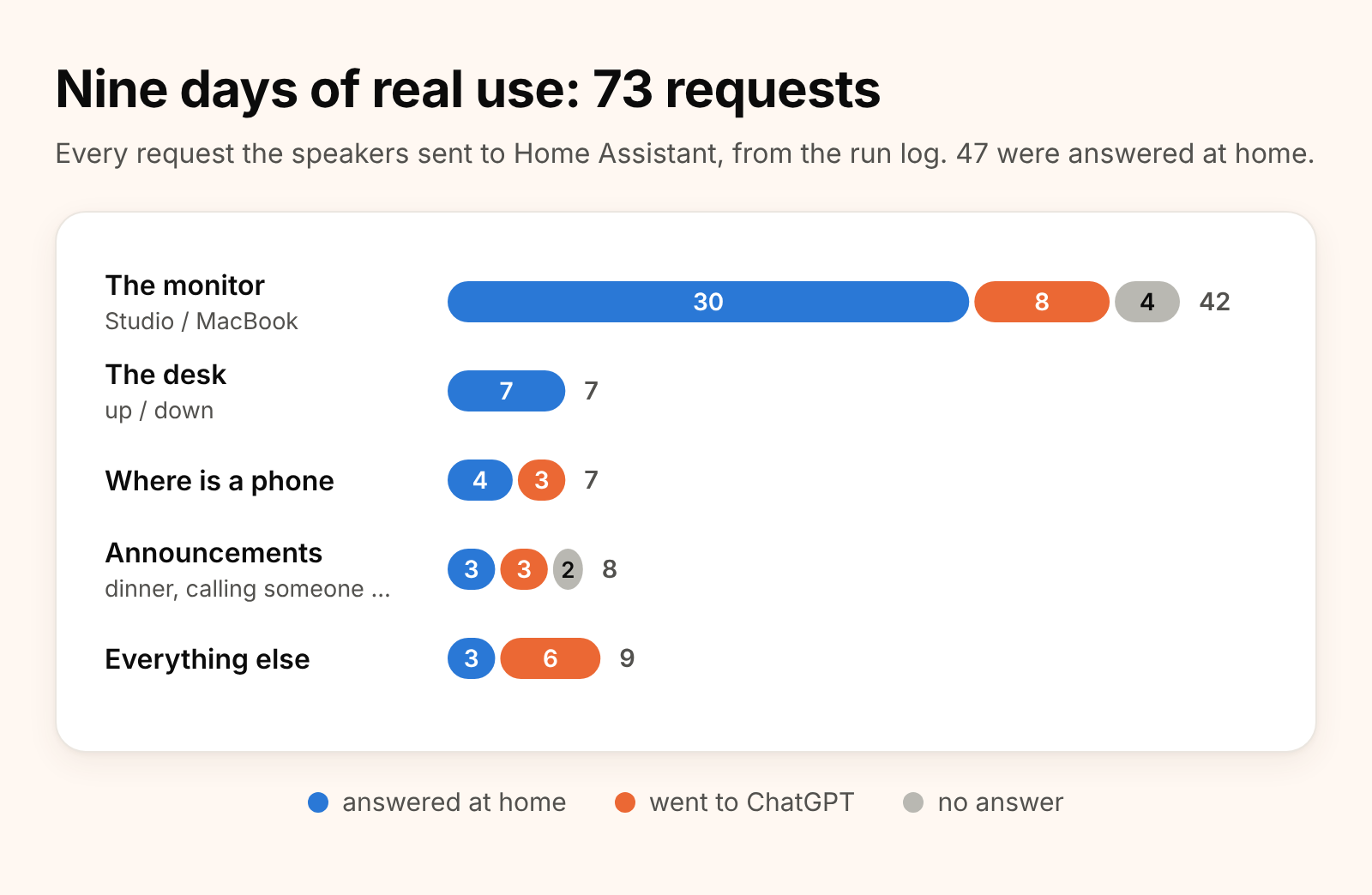
About two thirds of my requests are answered at home. And the thing I use most is the monitor switch, the reason all of this started. When it misses, it’s mostly because speech recognition heard “Mac Studio” as something else, so that’s where the next sentences go.
What went well and what didn’t
Good
- Measuring before deciding. Almost every turn of the day came from a number, not an opinion: the voice on the old CPU, GigaAM against Whisper, the 9B against the 4B.
- Asking “how fast is it where Home Assistant already runs?” That one question moved the whole thing off the Mac I develop on.
- Fewer moving parts at the end than in the middle: two pipelines instead of three, no VoiceStudio, nothing on the Mac in the normal path.
- Claude tested with recorded clips and dry runs, so no lights or blinds moved while it worked late in the evening.
Not so good
- Claude’s first “VoiceStudio does not help” was wrong, and it said that before reading VoiceStudio’s documentation.
- One of its fixes broke the offline brain, and that only showed up hours later.
- Home Assistant’s built-in replies and error messages are in English, so when the brain can’t be reached, a Russian conversation suddenly says “Cannot connect to the server”.
- The brain still guesses. ChatGPT claimed actions it hadn’t done, even after we told it not to, and the small model is wrong about one time in four.
So no, Claude isn’t the JARVIS from the films. But in one day it measured more options than I would have tried in a month, and it changed its mind when the numbers said so, which I can’t say about every engineer.
If you want to build one
The choices I would make again
| Part | My pick | Why |
|---|---|---|
| Speech to text | the language-specific model inside Home Assistant’s Whisper add-on (GigaAM for Russian) | fast on an old CPU, no extra machine |
| Voice | Silero in a small container | natural and about 0.2 s on a 2015 CPU; remember to turn numbers into words |
| Brain, online | ChatGPT gpt-4o-mini, no web search, one-sentence answers | 1.5–3 s |
| Brain, offline | a 4B model on any spare machine, kept warm | good enough for the rare offline day |
| Everything else | your own sentences for everyday phrases, and a miss log | 0.02 s, works offline, never lies |
What I would tell myself before starting
- I’d check the logs before buying or installing anything, because my “broken assistant” was just a program that wasn’t running.
- I’d measure on the machine Home Assistant already runs on first, because I found out only in the evening that the old OptiPlex beat the Mac on both speech jobs.
- When an AI says a tool won’t help, I’d ask it to read the tool’s documentation and measure before I believe it.
- I’d keep a miss log from the first day, since a week of real misses tells you more than any list of guesses.
- And I’d say one command per sentence, because “switch the monitor and turn on the light” matches nothing and goes to the brain.
What’s next
- More sentences for the ways speech recognition hears “Mac Studio”.
- Better sound: the Voice PE’s own speaker is fine for answers but weak for music, so I’m thinking about a printed speaker box with a small amplifier under each one.
- A friendlier answer than “Cannot connect to the server” when the brain is unreachable.
- Maybe, one day, a JARVIS voice after all.
Versions
| Thing | Version |
|---|---|
| Speakers | 2 × Home Assistant Voice PE, firmware 26.9.0 |
| Home Assistant | 2026.10, in a VM on a Dell OptiPlex with an Intel i5-6600 |
| Speech to text | GigaAM through the official Whisper add-on (3.5.3 today) |
| Voice | Silero v5_6_ru, voice xenia (English announcements v3_en, voice en_21; also stored: v5_cis_base with Belarusian voices, v4_ua Ukrainian), own small server in a Debian 13 container |
| Brains | ChatGPT gpt-4o-mini; Qwen3.5-4B (GGUF) in Unsloth on a Mac Studio M2 Max, 32 GB |
| Tried and dropped | VoiceStudio (Whisper large-v3 and v3-turbo, Qwen3-TTS 1.7B, OmniVoice, VoxCPM2), Speech-to-Phrase, Piper, Qwen3.5-9B, Qwen3-Coder 30B |
| Assistant | Claude in Claude Code |
How this post was written: Claude drafted it from the transcripts of our sessions and the project notes, made the cartoon and the diagrams with Google’s Gemini image model, and made the charts from the measurements in those sessions and from the speakers’ own request log.
Comments
Comments are GitHub Discussions; you need a GitHub account to write one.